
Is YMusic Safe? APK, Permissions and Account Risk
YMusic is conditionally safe to install when the APK matches the developer-source file, but file authenticity does not settle every risk. The APK requests 19 permissions, contains advertising components, and supports account-linked use. You still need to assess privacy, Google-account importance, Play Protect messages, and download rights.
Five-layer safety verdict
- File provenance: Supported
- Android access: Review before granting
- Privacy: Data collection is declared
- Google account: Use depends on account sensitivity
- Legal use: Permission depends on the content
The verified YMusic file record holds the current file details. The safety decision has 5 separate layers:
Five-layer safety verdict
File provenance: Supported
The hosted file matched the compared developer-source binary
Android access: Review before granting
The manifest declares 19 permissions, including storage, location, phone state, and package visibility
Privacy: Data collection is declared
The developer policy describes device, advertising, activity, and signed-in profile data
Google account: Use depends on account sensitivity
Sign-in adds account-linked data and service-enforcement exposure
Legal use: Permission depends on the content
An authentic APK does not grant a right to download every YouTube item
How Was the YMusic APK Identity Checked?
The hosted YMusic APK matched the compared developer-source binary and retained the expected package and signing identity. That result supports authenticity for the compared file, not a universal promise about security, privacy, or future releases.
A SHA-256 hash—a digital fingerprint calculated from every byte—changes when the APK changes. Matching full hashes and file lengths establish byte identity with an extremely high degree of confidence. The Android package identifier ties the file to the expected app identity, while the signing certificate ties updates to the same signing key.
| Evidence | What it establishes | What it cannot establish |
|---|---|---|
| Matching full-file hash | The 2 compared APK files contain the same bytes | The code contains no vulnerability |
| Matching file length | The files contain the same byte count | The files are identical without the hash comparison |
| Expected package identifier | Android recognizes the expected application package | The package owner follows every privacy claim |
| Consistent signing certificate | The APK carries the expected signing identity | Every certificate-signed release is risk-free |
Android rejects an in-place update when the new APK uses a different signing key from the installed app. That behavior turns certificate continuity into a practical tamper signal: an unexpected replacement prompt or signature conflict deserves investigation.
File provenance answers “is this the compared developer-source file?” File safety asks the larger question: “what can this code access and how does it behave?” The permission, privacy, and protection layers answer that second question.
What Permissions Does YMusic Request?
The inspected YMusic APK declares 19 permissions covering network access, storage, background media playback, device state, package management, advertising, and approximate location. A manifest declaration requests a capability; Android still controls whether a runtime or special permission receives approval.
The table translates every declaration into its practical purpose and decision value.
| Manifest permission | Plain-language capability | Safety interpretation |
|---|---|---|
INTERNET | Connects to web services and streams media | Core network capability; network access also enables data transfer |
ACCESS_NETWORK_STATE | Checks whether a connection exists and what type it uses | Supports connection handling without reading message content |
ACCESS_WIFI_STATE | Reads Wi-Fi connection state | Reveals connection information, not the Wi-Fi password |
WRITE_EXTERNAL_STORAGE | Writes files to shared device storage on supported Android versions | Matches offline saving; broad legacy storage access deserves review |
READ_EXTERNAL_STORAGE | Reads files from shared storage on supported Android versions | Supports local-library access; Android limits or ignores the permission on newer versions |
FOREGROUND_SERVICE_MEDIA_PLAYBACK | Runs playback through a visible foreground service | Supports background audio with a persistent notification |
FOREGROUND_SERVICE | Keeps a user-visible task active in the background | Supports playback or downloads; Android requires visible service behavior |
WAKE_LOCK | Keeps the processor awake during playback or downloads | Prevents interruption but can increase battery use |
MODIFY_AUDIO_SETTINGS | Changes audio-routing or playback settings | Supports media output and call/playback transitions |
REQUEST_IGNORE_BATTERY_OPTIMIZATIONS | Opens Android’s request to exempt the app from power limits | Can improve uninterrupted playback; exemption increases background freedom |
ACCESS_COARSE_LOCATION | Accesses approximate, not precise, location | The developer policy links it to regional suggestions; deny it if that value is unnecessary |
READ_PHONE_STATE | Reads call state and limited device/telephony information allowed by Android | The policy links it to pausing during calls; the permission covers more than a pause command |
QUERY_ALL_PACKAGES | Sees the set of apps installed on the device where Android permits it | Broad app visibility is sensitive because the installed-app list can reveal user interests |
REQUEST_INSTALL_PACKAGES | Asks Android to install another APK | Supports self-update flows; Android still presents an approval screen |
REQUEST_DELETE_PACKAGES | Requests removal of an installed package | Android requires user involvement; the declaration does not allow silent deletion |
AD_ID | Reads the resettable Android Advertising ID where available | Supports advertising or attribution and connects activity to a device-level ad identifier |
| Google C2DM receive permission | Receives Firebase/Google push messages | Supports notifications or background messaging |
| Install Referrer permission | Receives installation-source and campaign-attribution data | Supports marketing attribution rather than music playback |
| Samsung feature-survey permission | Connects to Samsung’s feature-usage reporting interface on compatible devices | Applies to Samsung-specific integration; non-Samsung devices ignore the vendor capability |
The inspected manifest does not declare camera, microphone, contacts, or SMS access. That absence narrows the permission surface; it does not describe every network request made by an included software development kit.
Android’s version rules change the effect of 4 entries. Legacy read/write storage permissions lose reach under newer scoped-storage rules. Advertising ID access also depends on device settings and Android behavior. Package installation and deletion requests open system-controlled flows; neither permission silently bypasses the confirmation screen.
Treat the Android permission prompt as a feature decision:
- Grant storage access when you want YMusic to save or manage audio in shared storage.
- Deny approximate location when regional suggestions do not justify the access.
- Keep package-install approval limited to an update action you started.
- Review battery exemption only when background playback stops under normal power settings.
- Revoke an access category that YMusic does not need for your chosen use.
The riskiest mistake is approving every prompt because the app requested it. The opposite extreme also breaks expected functions: denying storage can prevent offline-file access, and aggressive battery limits can stop background playback.
What Data Does YMusic Say It Collects?
YMusic’s privacy policy says signed-out use collects device, network, location, and advertising information, while signed-in use adds a YouTube account name, email address, and profile picture. The policy also describes analytics for searches, watched items, and downloads.
| Data category | Signed out | Signed in |
|---|---|---|
| Operating-system and application version | Yes | Yes |
| Device language, screen properties, CPU architecture, model, and manufacturer | Yes | Yes |
| Timezone and IP address | Yes | Yes |
| Approximate location | Yes | Yes |
| Google Advertising ID | Yes | Yes |
| Search, watch, and download activity through Firebase Analytics | Declared | Declared |
| YouTube account name | No | Yes |
| YouTube account email | No | Yes |
| YouTube account profile picture | No | Yes |
The YMusic privacy policy carries an effective date of 26 January 2019. The policy says email addresses are stored in encrypted or hashed form and says analytics activity is not linked to email or IP address. Those statements are developer declarations, not conclusions produced by the Android manifest.
The date matters. The inspected APK declares permissions and components beyond the policy’s 7-item permission explanation, including installed-package visibility, Advertising ID, package deletion requests, Install Referrer, and foreground-service capabilities. The policy therefore supplies the declared purpose and collection model, while the manifest supplies the current capability list.
Android settings let you revoke runtime permissions, but revocation does not erase data already sent to a server. Signed-out use also does not mean anonymous use: an IP address, Advertising ID, device model, timezone, and coarse location can still distinguish a device or session.
Does YMusic Contain Ads or Tracking Components?
The base YMusic APK contains AppLovin components and the Advertising ID permission, so “ad-free” is not a reliable blanket description. YMusic, YPlugin, and Support Development use 3 different product and funding roles.
| Product | Advertising or payment signal | Data declaration |
|---|---|---|
| YMusic APK | AppLovin code and Advertising ID permission are present | The YMusic policy names Firebase Analytics and AppLovin |
| YPlugin | Google Play labels the app “Contains ads” and “In-app purchases” | The developer declaration lists app activity, app information/performance, and device or other IDs as collected and shared |
| Support Development | Google Play lists an in-app purchase and says the app adds no functionality | The developer declaration says no data is collected or shared |
The YPlugin listing says the plugin unlocks YMusic features. The Support Development listing describes a funding mechanism for maintenance, not a feature package.
An included advertising library proves code presence, not how often an ad appears or which fields leave the device during one session. The combination of AppLovin, Firebase Analytics, Advertising ID, Install Referrer, and the policy’s activity list does establish that the software has advertising and measurement capabilities.
Is YMusic Safe for a Google Account?
A Google-account sign-in adds account-linked data and service-enforcement exposure, even though no published dataset establishes a YMusic-specific suspension rate. Your account’s importance should control the decision.
YouTube’s Terms of Service tell users not to reuse a Google account password in a third-party application. Enter credentials only through a genuine Google authorization surface; never type a Google password into a form controlled by an APK.
| Use mode | Exposure | Suitable decision |
|---|---|---|
| Signed out | Device, network, advertising, location, and activity data remain in scope | Choose this mode when account-only features add no value |
| Separate low-value account | Account profile data and service history become linked | Limits the consequence of an account problem but does not remove policy obligations |
| Primary Google account | Personal mail, purchases, channel identity, and recovery relationships can raise the consequence of compromise or suspension | Use only when account-linked YMusic functions justify the larger consequence |
No account choice makes prohibited downloading acceptable. A separate account reduces the blast radius of an account-specific incident; it does not convert a Terms violation into permitted use.
Revoke YMusic’s Google-account access from the Google Account security controls when access is no longer needed. Change the Google password and review active sessions when the authorization screen looked wrong or credentials were entered directly into an app-controlled form.
What Does a Google Play Protect Warning Mean?
A generic sideload warning describes an installation source, while a specific harmful-app verdict describes a security classification. The message text determines the action.
| Android message | Meaning | Action |
|---|---|---|
| Allow installs from this source | Android needs per-source permission before a browser or file manager can launch the package installer | Grant it only to the app handling the intended APK, then disable it afterward |
| Unknown or uncommon app | Google lacks enough reputation data to clear the app automatically | Confirm the file identity and keep Play Protect enabled |
| Potentially harmful app, malware, trojan, spyware, or blocked installation | Play Protect assigned a named risk or harmful classification | Stop the installation and remove the APK |
Google Play Protect can warn about or block potentially harmful apps installed from the internet or another marketplace. Google’s malware policy also states that an uncommon classification can reflect insufficient reputation data rather than confirmed harm.
Never disable Play Protect to force an installation. A generic source prompt is a normal Android control. A named harmful-app warning is a security decision, not an installation inconvenience.
Can VirusTotal Prove That YMusic Is Safe?
VirusTotal can show what participating engines found in one exact file at one point in time; VirusTotal cannot prove privacy compliance, secure server behavior, or future safety. A scan result belongs to the scanned hash only.
| A multi-engine scan can support | A multi-engine scan cannot support |
|---|---|
| Whether engines detected known malicious patterns in that file | Whether the app collects more data than you expect |
| Whether a detection is shared by 1 engine or repeated across engines | Whether a remote server later sends harmful content |
| Whether 2 APK files with different hashes received different results | Whether an unscanned modified APK is safe |
| Whether the report corresponds to a named file hash | Whether future updates retain the same behavior |
A single detection is not automatically a false positive, and a low detection count does not create a safe numerical rule. Review the detection names, engine agreement, signing identity, file origin, and requested capabilities together.
The YMusic record owns the current verified build and its file-specific security status. The safety verdict remains conditional when no dated scan count is published.
Are Modified YMusic APKs Safe?
A modified YMusic APK carries a different binary identity and can add code, permissions, trackers, or signing keys that the standard-file evidence does not cover. The standard build’s provenance result never transfers to a changed file.
Treat “premium unlocked,” “no ads,” and renamed-package claims as code-change disclosures, not benefits without cost. Any code edit changes the hash, and repackaging usually changes the signing certificate. A clone can also preserve the visible YMusic name while installing under another package identity.
Use the standard build when provenance matters more than altered features. The deeper modified YMusic APK risks analysis owns certificate changes, permission drift, bundled code, and safe fallback decisions.
Is Downloading Music With YMusic Legal?
Permission depends on YouTube’s service terms, rights-holder authorization, and applicable law—not on whether the YMusic APK contains malware. Software safety and download permission answer different questions.
YouTube’s Terms of Service restrict downloading or reproducing content except when YouTube permits the action, the relevant rights holder grants permission, or applicable law permits it. The terms also prohibit interference with features that restrict copying or use.
Download content you own, public-domain material, or media for which the rights holder granted the required permission. A creator making a track publicly viewable does not automatically grant an offline-copy right outside YouTube’s permitted features.
Copyright exceptions differ by country and use. Personal use alone does not create a universal exception, and an APK’s availability does not settle the legal status of every download.
How Can You Reduce YMusic Installation Risk?
Risk drops when you confirm the standard file, keep Android protections active, limit access, and separate reversible app problems from account or device compromise.
- Start with the standard YMusic file. A modded or renamed APK invalidates the standard build’s identity evidence.
- Keep Play Protect enabled. Stop when Android names malware, spyware, a trojan, or another harmful classification.
- Confirm the package and signing continuity. An unexpected clone identity or signature conflict can indicate a repackaged file.
- Grant permissions by function. Storage supports saved audio; approximate location and installed-app visibility deserve a separate value decision.
- Prefer signed-out use when account features are unnecessary. Signed-out mode still exposes device and network data but avoids adding profile data.
- Protect the primary Google account. Never enter a Google password into an app-controlled form, and revoke access that is no longer needed.
- Remove install-source permission after installation. Your browser or file manager does not need standing authority to launch APK installs.
Uninstall YMusic and revoke its permissions when the app behaves outside the expected media, storage, update, or notification functions. Review Google-account sessions when an authorization flow looked different from Google’s normal sign-in surface.
YMusic Safety FAQ
YMusic safety depends on the exact APK identity, the permission you grant, the warning Android displays, and whether you connect a Google account.
The inspected YMusic build targets API level 29, which corresponds to Android 10. Newer Android versions can display a compatibility or privacy warning because the target level does not adopt every newer platform restriction. The warning identifies an older target level; the warning does not itself classify the APK as malware.
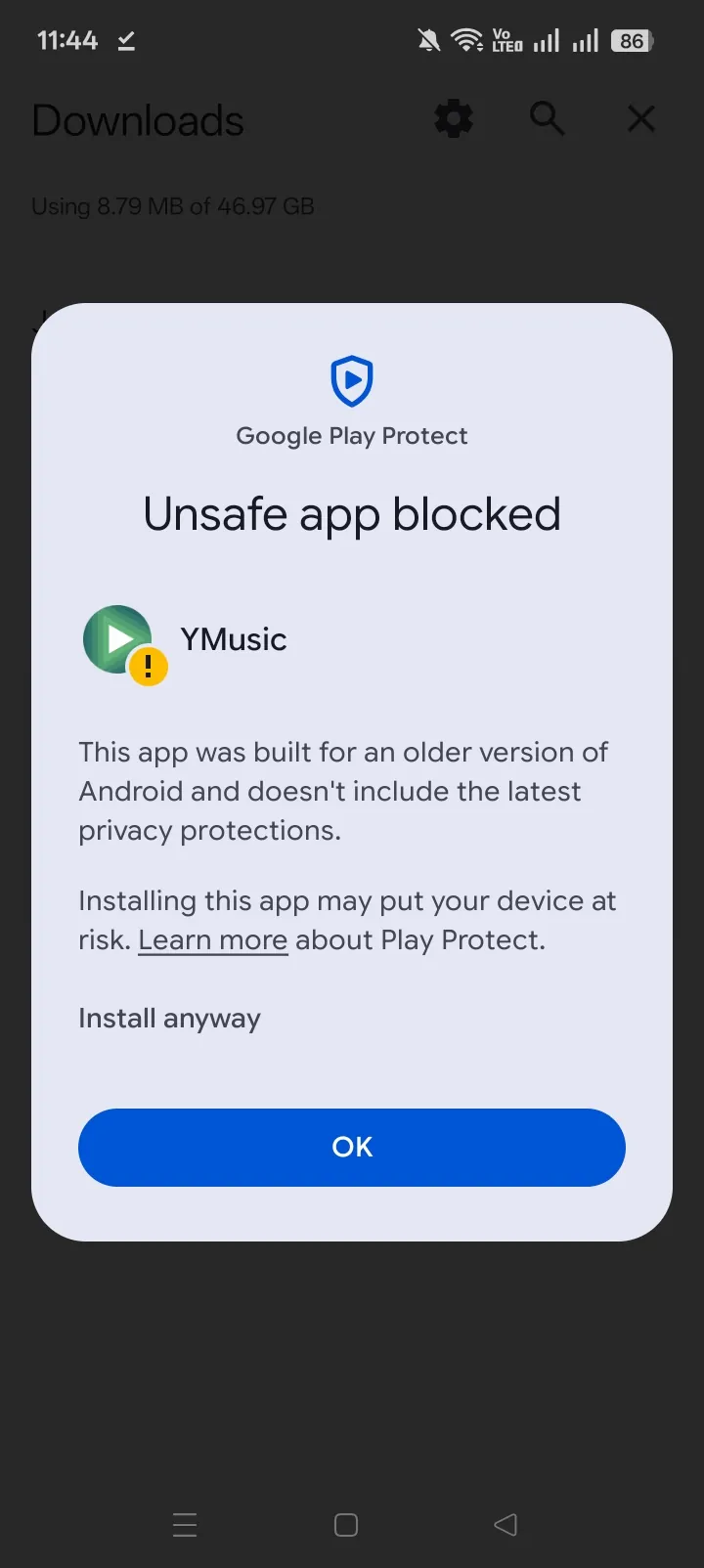
No file-wide trojan verdict can be inferred from an app name, a forum comment, or one generic sideload prompt. A named Play Protect classification or a hash-specific multi-engine report supplies file-specific evidence. Stop installation when Android identifies a trojan or another harmful category.
YMusic uses storage access to save downloaded audio and read local media on Android versions where legacy storage permissions still apply. Newer Android versions reduce those permissions through scoped storage. Denying storage can disable offline saving or local-library functions.
YMusic can provide signed-out browsing and playback functions without adding YouTube profile data to the developer-declared collection. Account-linked features require sign-in. Use signed-out mode when subscriptions, history, or another account feature adds no value.
Android lets you revoke runtime permissions through Settings → Apps → YMusic → Permissions. Special access—such as install unknown apps or battery-optimization exemption—uses separate Settings screens. Revoking a permission can disable the feature tied to that access.
Verify YMusic before installation
Use the current file record, keep Android protections active, and grant only the access required for the selected feature.