
YMusic APK Download for Android 2026
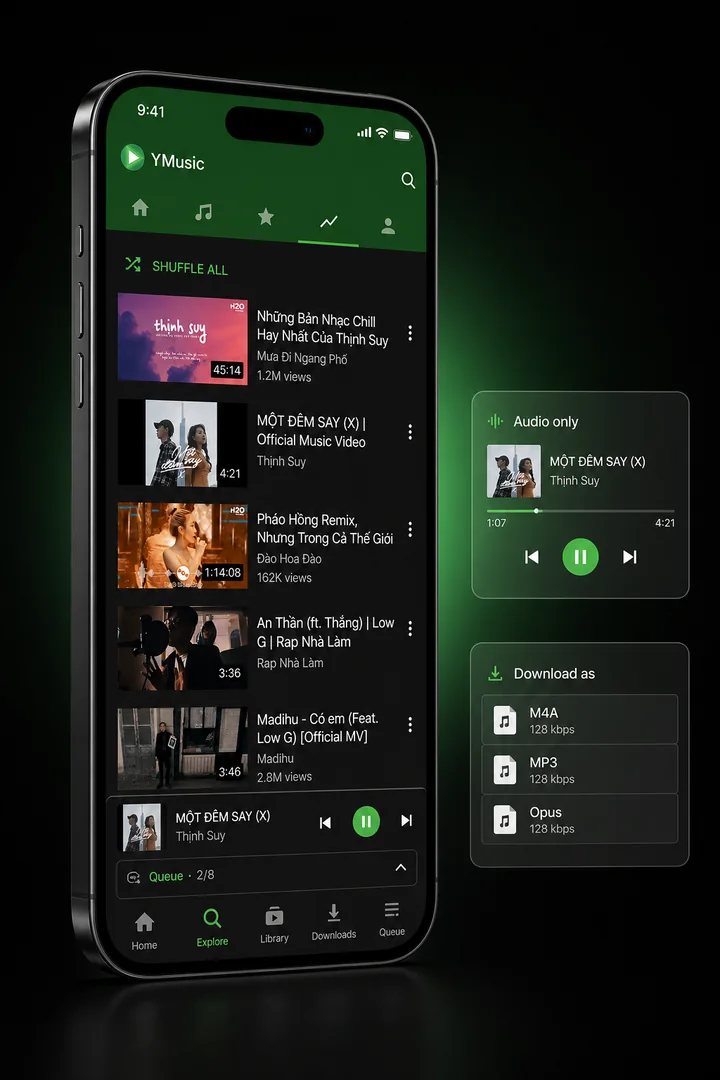
YMusic V4 APK plays supported YouTube content as audio, continues playback when the screen turns off, and saves supported media for offline use. Android 7.0 or newer is required. ARM64 fits most current phones; ARMv7 and x86 builds serve older hardware and emulators.
| File detail | Verified value |
| Version | 4.0.6 |
| Version code | 7 |
| Primary file | android-arm64.apk |
| Exact size | 9,425,803 bytes |
| Package | io.ymusic.android |
| Architecture | ARM64 / arm64-v8a |
| Android requirement | Android 7.0+ / API 24+ |
| Target SDK | API 35 |
| Compile SDK | API 36 |
| Release date | 2026-10-18 |
| SHA-256 | b34e752447a421bcd6b068eb8501b565c0e5f939197cc17d7e657dd211a593a3 |
| Integrity | Exact byte-for-byte match with the developer release asset |
| Malware scan | No dated detection count accompanies this release record |
A SHA-256 hash—a digital fingerprint for a file—confirms whether 2 files contain identical bytes. The matching hash proves that the hosted ARM64 APK matches the developer release asset. A checksum does not prove that every runtime action is safe or that an online service will remain available.
Which YMusic APK should you download?
Choose the APK that matches the Android device processor. ARM64 fits most current phones and tablets. ARMv7 serves older 32-bit ARM devices, while x86 builds primarily serve Android emulators.
| Android device | Exact size | SHA-256 |
| Most current phones and tablets — ARM64 | 9,425,803 bytes | b34e752447a421bcd6b068eb8501b565c0e5f939197cc17d7e657dd211a593a3 |
| Older 32-bit ARM hardware — ARMv7 | 9,345,745 bytes | 91bcb30a5d0e5b9fc391ba4288ab6336b130b5c9ef07c439bb47cf3a5038a932 |
| 32-bit x86 emulator or compatible device | 9,603,793 bytes | 6a319c502119a0c6691a843d3012b9ab3bd410d097b0db6614515a5bcf50ca57 |
| 64-bit x86 emulator or compatible device | 9,694,194 bytes | 61b85ce13343e3e8ce8d9c07c3b07e2320ae5bed3c6a96d7d1f7184cc396dac3 |
When the processor type is unknown, check the ABI in a device-information app. Installing the wrong architecture normally ends with an incompatible-package or installation error; changing Android security settings cannot correct a processor mismatch.
What Is YMusic APK?
YMusic APK is an Android audio browser and player built around YouTube content. YMusic can continue audio playback when another app opens or the screen turns off, stream audio without loading the full video view, and save supported audio files for local playback.
The V3.9.23 APK uses the package identifier com.kapp.youtube.final. Its signing certificate names Khang NT, while the current Google Play support apps use the KDEV developer label. These identity signals matter because a renamed or modified package can look like YMusic while carrying different code or a different signature.
YMusic is not the same application as YouTube Music. YouTube Music belongs to Google’s licensed music service and ties background/offline features to its own account and subscription rules. YMusic runs as a separate Android application distributed as an APK.
Two related Google Play apps also serve different jobs. YPlugin says it unlocks YMusic features and includes ads and in-app purchases. Support Development adds no YMusic function; its listing says the purchase funds development and maintenance.
What Can YMusic Do?
YMusic focuses on audio playback, downloads, and local-library control instead of a video-first screen. The exact behavior depends on the selected source, available stream, Android version, and account state.
Background audio:
Music can continue while you use another app or turn off the display.
Audio-only playback:
YMusic can load the audio stream without keeping the video view active.
Audio downloads:
Supported items can be saved in formats such as MP3, M4A, and Opus. Available format and quality choices depend on the source stream.
Local playback:
Downloaded tracks and existing device audio can appear in the local library.
Playlists and queues:
YMusic can organize tracks for sequential playback and retain a listening queue.
Playback tools:
The app includes an equalizer, sleep timer, speed controls, and a floating player.
Library metadata:
Album, artist, artwork, and tag handling help organize downloaded files, though source metadata can require manual correction.
Audio-only playback reduces transferred data when the alternative is streaming the matching video, but no fixed savings percentage applies to every item. Codec, resolution, stream availability, and listening time all change the result.
The full YMusic feature guide explains format choices, background playback, playlists, local-library behavior, and the add-on apps without crowding the download decision.
Does YMusic V4 replace YMusic V3?
No. YMusic V4 installs beside V3 because the generations use different package names and signing certificates. V4 uses io.ymusic.android; V3.9.23 uses com.kapp.youtube.final. Android therefore treats them as separate applications rather than an ordinary update.
Open V4 and check the playlists, settings and downloaded files that matter before removing V3. Android does not automatically transfer private application data between different package names. The YMusic old-version archive retains the V3 file and compatibility record for Android 5 and 6 devices.
What changed in YMusic V4.0.6?
The release corrects Android playback, download, notification, storage and sign-in failures. Unsupported video quality can retry as audio-only playback; downloads without an Opus stream can save as M4A; full storage returns a disk-space error; and expired YouTube sign-in state requests a new sign-in.
Additional fixes address picture-in-picture crashes, a missing system file picker, long or emoji-heavy filenames, player-service restarts, server changes during downloads and freezes while media or download state changes. CPU use also drops while YouTube video plays.
Will YMusic Work on Your Android Device?
The downloadable files require Android 7.0 or newer. ARM64 covers the processor family used by most current Android phones, but an x86 emulator or 32-bit-only device needs a matching variant instead of the ARM64 file.
| Compatibility item | What it means |
| Minimum SDK 24 | Android 7.0 is the oldest declared install level |
| Target SDK 35 | The APK declares Android API 35 behavior |
| Compile SDK 36 | The APK was built with API 36 tooling |
| ARM64 filename | This download targets 64-bit ARM hardware |
| Storage access | Downloads and local-library functions need access to media files |
Battery controls also differ by phone maker. Samsung, Xiaomi, Oppo, Realme, and Vivo can stop background playback when their power manager suspends the app. Grant only the battery exception needed for playback; broad battery exemptions reduce Android’s ability to limit background activity.
Free storage must cover more than the compressed APK. Android needs temporary space to stage the package and permanent space for the installed app, cache, artwork, and downloaded audio. If the package installer stops without a useful message, free storage before changing security settings. A damaged partial download produces the same result on every retry until the file is replaced.
Is the YMusic APK Safe to Install?
The hosted ARM64 APK matches the developer release asset byte for byte. Provenance does not equal an absolute safety guarantee, and a checksum does not describe runtime behavior.
What does the YMusic V4 Android manifest declare?
The Android V4 manifest declares 12 permissions, including internet access, notifications, foreground media playback, foreground data sync, wake lock, camera, package-install requests, biometric or fingerprint access and network-state access. The camera hardware feature is optional, and the package includes a non-exported QR-scan activity.
Permission presence describes what Android capabilities the app can request; it does not prove how every feature handles data at runtime. The existing 19-permission analysis belongs to V3.9.23 and remains labelled as V3 evidence on the YMusic safety analysis.
Google Play Protect can scan apps installed outside Google Play and warn about harmful or unverified software. Keep Play Protect enabled, stop if the installer reports a specific harmful-app detection, and compare the downloaded file hash with the table before installing. A generic sideload warning only identifies the install source; a named malware warning needs a separate decision.
Modified YMusic APKs carry a higher identity risk because any code change produces a different hash and often a different signing certificate. The YMusic permissions and file-provenance analysis explains each permission, ad component, Play Protect message, account concern, and modified-file risk.
YouTube’s Terms of Service restrict downloading except when the service permits it, the rights holder grants permission, or applicable law allows it. Download only content you own or have permission to save.
How Do You Install YMusic on Android?
Install YMusic by granting your browser or file manager one-time permission to install an APK, opening the downloaded file, and accepting Android’s package prompt. Sideloading—installing software from outside Google Play—uses a source-specific Android permission.
- Download the APK. Save android-arm64.apk (or the build that matches the device) from the button above. The completed file should match the byte count and hash in the file table.
- Allow the install source. When Android blocks the file, open Settings > Apps > Special app access > Install unknown apps. Select the browser or file manager that opened the APK, then enable Allow from this source.
- Run the package installer. Return to the download, open the downloaded APK, review the app name and requested action, then tap Install.
- Open YMusic and remove the installer permission. Launch the app, grant only the permissions required for the feature you use, then disable Allow from this source for the browser or file manager.
Android 7 and older use a device-wide Unknown sources switch instead of the per-app setting. Android 8 and newer attach the permission to the source app.
An “App not installed” error can mean insufficient storage, a damaged download, a processor mismatch, or a signature conflict with an existing copy. Do not uninstall an existing app until local playlists, settings, and downloads are backed up. The device-specific YMusic installation steps cover Samsung One UI, Xiaomi HyperOS, Oppo/Realme ColorOS, Vivo Funtouch OS, old Android menus, and signature conflicts.
Does YMusic Contain Ads or Paid Features?
The V3.9.23 APK contains AppLovin advertising components, so “no ads” is not an accurate blanket description of that build. YMusic, YPlugin, and Support Development use 3 different distribution and funding roles.
| Component | Current listing or file evidence | Practical meaning |
| YMusic V3.9.23 APK | AppLovin classes and Advertising ID permission | Advertising code exists in the base APK |
| YPlugin | Contains ads and in-app purchases; listing says “Unlock all features of YMusic for free” | Add-on behavior and advertising can affect the experience |
| Support Development | Paid support app; listing says it adds no functionality | Purchase funds maintenance instead of adding a feature |
The APK costs nothing to download from this URL. That fact does not mean every feature, add-on, or ad-removal path costs nothing. Store prices also vary by country and tax, so a hardcoded purchase price would go stale.
What Problems Can Stop YMusic from Working?
YMusic failures fall into 4 common groups: YouTube-side playback changes, account-state errors, Android background limits, and APK installation conflicts. A reinstall cannot fix every group.
| Symptom | First action |
| Error 403 or content unavailable | Update to the current build, test signed-out playback, and avoid repeated account retries |
| Playback stops after about 1 minute | Check for a current app fix, then test without account sign-in |
| Music stops with the screen off | Remove YMusic from the phone maker’s restricted or sleeping-app list |
| Download fails but streaming works | Check storage access, free space, format choice, and source availability |
| “App not installed” | Confirm ARM64 support, file hash, free space, and signing compatibility |
| Playlist or account content disappears | Stop changing account state and back up local data before clearing app storage |
Error 403 has returned after YouTube-side changes and has also affected account-linked sessions. A fixed repair time does not exist. Repeated sign-in attempts or switching accounts carries an account risk when the cause remains unknown, so unsigned playback is the safer diagnostic step.
Preserve local playlists and downloads before clearing storage, uninstalling the app, or changing the signed-in account.
The YMusic troubleshooting guide separates playback, download, background, account, and installation symptoms before any destructive reset.
Can You Use YMusic on PC, Mac or iPhone?
Release files are currently available for Android and macOS. Windows, Linux and iOS remain listed as upcoming, so an .exe, .msi, Linux package or IPA should not be presented as a current YMusic release.
| Platform | Release status |
| Android | Available: ARM64, ARMv7, x86 and x86_64 APKs |
| macOS | Available: Apple Silicon and Intel DMGs |
| Windows | Upcoming; no current native installer |
| Linux | Upcoming; no current package |
| iOS/iPadOS | Upcoming; no current installation file |
Use the YMusic for PC emulator path for processor and storage requirements on Windows.
An iPhone cannot install an Android APK. No verified YMusic IPA exists for iOS, so the YMusic options for iPhone should be chosen by background playback, offline access, and licensed-catalog needs.
YMusic for macOS
The V4 release includes separate native disk images for Apple Silicon and Intel Macs. Processor selection, exact DMG sizes, checksums and download buttons belong on the Mac page.
Should You Use an Old or Modified YMusic APK?
Use the current standard build unless a specific device or regression requires a rollback. An old release can restore compatibility, but it can also retain playback code that YouTube no longer accepts.
The YMusic version archive owns historical build codes, dates, hashes, and rollback notes. Back up local playlists and downloads before replacing a newer app, because Android can block a downgrade or erase app data during removal.
A modified APK can remove, add, or alter code. Its hash must differ from the standard file, and a changed signing certificate blocks an in-place update over a differently signed copy. Never treat “premium unlocked” as proof of safety. A modification that changes monetization can also add hidden code, tracking, or install behavior.
The YMusic alternatives comparison matches NewPipe, YouTube Music, Spotify, Seal, and VLC to different listening, download, account, and device requirements.
YMusic APK FAQ
Download the Verified ARM64 Build
The download below matches the developer-source ARM64 file by exact byte count and SHA-256. Keep the hash record with the APK, review Android’s install prompt, and use the permissions required for the features you choose.